Free & open source · macOS 14+

Your notch, alive.

Perch turns the MacBook notch into a live, interactive island for music, HUDs, alerts and your day.

Apple Silicon · macOS 14+ · or build from source

Hover or tap the notch to open it.

Features

The notch you already have,
doing a lot more.

Music, system overlays, live activities, notifications and your calendar, in the space that used to be dead pixels.

Media

Now Playing, from any app.

Browsers included. Artwork, title, artist, a seekable progress bar and playback controls, right under the camera.

  • Optional shuffle, repeat and like buttons
  • Artwork styles: full color, gradient backdrop or mono
  • The player can take its tint from the artwork
  • Closed, the notch shows the artwork and a live audio visualizer
HUDs

Volume and brightness, redrawn.

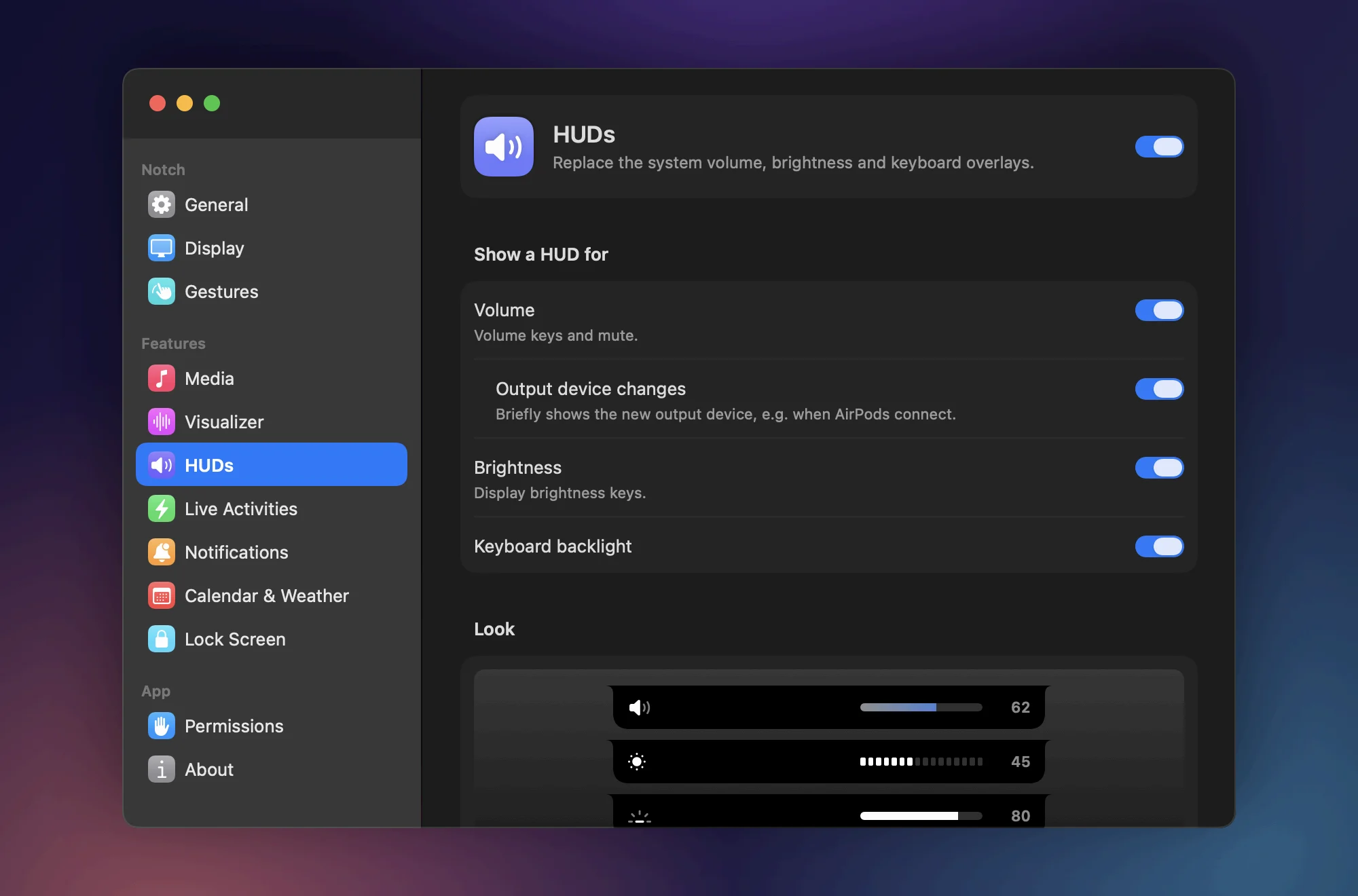
Replaces the system volume, brightness and keyboard backlight overlays with HUDs that live in the notch.

  • Six bar styles
  • Per-HUD rules for the lock screen and Focus
  • Brightness keys also work on external displays (DDC on Apple Silicon)

Live Activities

What just happened, at a glance.

Charging and unplugging with time remaining, low battery, Low Power Mode, Focus changes and track changes.

  • Bluetooth devices connect with their battery level
  • AirPods show left, right and case
  • Swipe sideways on the closed notch to cycle recent activities

Notifications

Codes you can copy in one click.

Mirrors delivered notifications into the notch, from email apps or from apps you choose.

  • Bursts are grouped, not stacked
  • One-time codes get a Copy button

And the rest of your day.

Calendar & Weather

Your day, one swipe down.

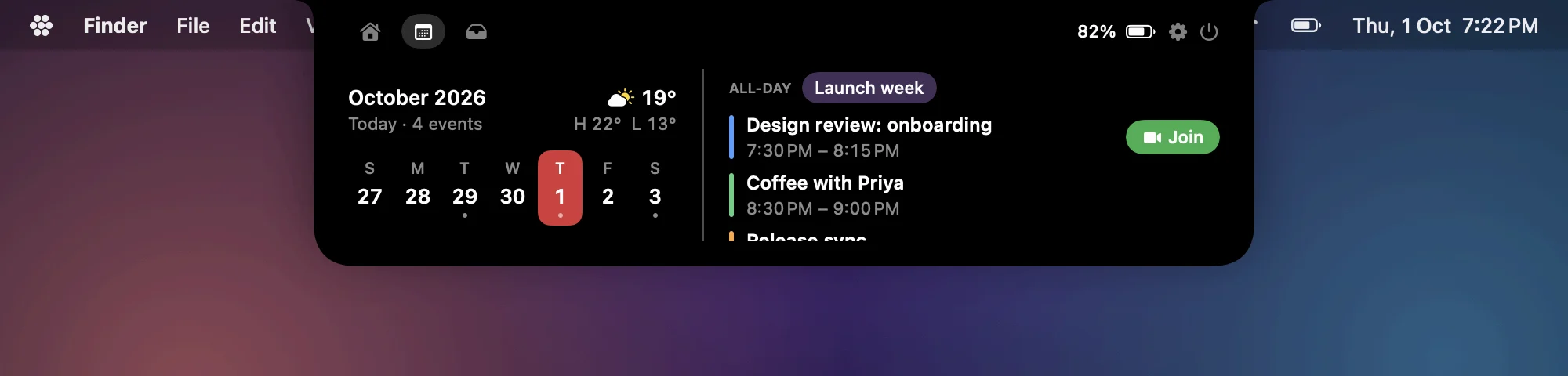
A week strip with the day's events, or an agenda view. Meeting alerts with a Join button, time-to-leave, an optional hourly chime, and today's forecast from Open-Meteo.

Calendar tab: a week strip, today's events with a Join button, and the weather

Lock Screen

Widgets on the lock screen.

Now Playing, battery, weather, next event and Bluetooth. Can also show over the screensaver.

Gestures

Swipe, don't click.

  • ↓Open the notch
  • ↑Dismiss an activity, or close
  • ↔Cycle activities, skip tracks, switch tabs

Shelf

A place to put things down.

Drop files on the notch to hold them for later. Drag them back out, or double-click to open.

URL scheme

Scriptable.

Drive it from Terminal, Shortcuts or any launcher.

$ open perch://open/calendar
$ open perch://settings/huds
$ open perch://close

Settings

Every detail, your call.

A searchable, System Settings-style window. Choose which displays show the notch, or a simulated notch on displays without one. Set its size, and whether it hides in fullscreen apps, games, Mission Control and screen recordings.

Also: launch at login and a menu bar icon.

Perch Settings window on the HUDs pane, with toggles for volume, brightness and keyboard backlight

Open source

Built in the open.
Free for good.

Perch is MIT-licensed and written in Swift and SwiftUI. Read every line, change what you don't like, ship it back.

  • MIT licenseUse it, fork it, ship it.
  • Swift & SwiftUINative, no web views.
  • No telemetryNo analytics, no tracking.
  • No accountNothing to sign up for.

Contribute

  1. 1
    Fork

    Fork d4nuux/perch and clone it.

  2. 2
    Build

    ./build.sh --run builds and launches it from ./build.

  3. 3
    Open a PR

    Bug fixes, features and polish are all welcome. Start with an issue for bigger changes.

Install

Get Perch.

Download the app, or build it yourself with one command.

Download

The ready-made app. Free, about 5 MB.

Download Perch.dmg

Apple Silicon · macOS 14 or later · all releases

First launch

Perch is self-signed, not notarized by Apple, so macOS blocks it once:

  1. Open the DMG and drag Perch into Applications.
  2. Open Perch, then close the "can't verify the developer" alert.
  3. In System Settings › Privacy & Security, click Open Anyway. On macOS 14 you can right-click Perch and choose Open instead.

Or build from source

Terminal
git clone https://github.com/d4nuux/perch.git
cd perch
./build.sh --install

--install builds, copies Perch to /Applications and launches it. Use ./build.sh to just build, or --run to launch from ./build.

Requirements

  • macOS 14 Sonoma or later (live visualizer needs 14.4+)
  • Apple Silicon or Intel. On Intel, build from source. Displays without a notch can show a simulated one.
  • Xcode Command Line Tools xcode-select --install
Optional: stable signing.

macOS ties permissions to the code signature, and ad-hoc builds lose them on every rebuild. Create a self-signed code-signing certificate named NotchApp Local Signing once and build.sh uses it. Steps in the README.

Perch asks for each permission only when a feature needs it. Settings › Permissions shows the status of each.

FAQ

Straight answers.

Is Perch free?

Yes. It's MIT-licensed open source. No paid tier, no account, no telemetry.

Does it use private APIs?

Yes. MediaRemote for system-wide Now Playing, SkyLight for lock-screen widgets, and DisplayServices / CoreBrightness for built-in display and keyboard backlight brightness. Each one is loaded at runtime. If a symbol is missing after a macOS update, that feature turns itself off and the rest of the app keeps working.

Why isn't it on the App Store?

Because of those private frameworks. The App Store doesn't allow them, so Perch is distributed here instead.

Why does macOS warn me when I open it?

Notarizing needs a paid Apple Developer account; Perch is self-signed instead. The warning shows once. After Open Anyway it launches normally. Prefer not to trust a download? Build it from source.

My Mac doesn't have a notch. Does it work?

Yes. Displays without a notch can show a simulated one, and you can choose which displays show it.

Which macOS versions are supported?

macOS 14 Sonoma or later, on Apple Silicon or Intel. The live audio visualizer needs macOS 14.4+.

Does the visualizer record my audio?

No. It uses the System Audio Recording permission to read audio levels only. Nothing is recorded to disk.

Why do my permissions reset after every rebuild?

Ad-hoc signatures change on every build. Set up the optional NotchApp Local Signing certificate and permissions survive rebuilds.

Perch app icon

Give your notch something to do.